
On this page
Illustration generated with Cloudflare Workers AI (FLUX.2 klein)
Updated 18 Nov 2026: rewritten from scratch for macOS 26 Tahoe and OpenCore.
A kext (kernel extension) is a bundle of code that macOS loads into its kernel, the core of the operating system. Most kexts are drivers: they let macOS talk to a graphics card, an audio chip or a network card. Apple has deprecated most kexts in favour of DriverKit and system extensions, but a Hackintosh still depends on them. macOS 26 Tahoe is the last macOS for Intel Macs, so it is also the last release Hackintosh kexts can target.
The paths, counts and loaded kexts below come from a working Tahoe 26.7.3 Hackintosh that we inspected for this update. Apple’s rules come from Apple’s documentation, listed under Sources.
Inspected by our setup on 17 Nov 2026
- What we did: inspected a working install with read-only commands. Nothing was installed, loaded, changed or rebooted.
- On: Intel Core i9-9980HK, UHD 630, 64 GB, macOS 26.7.3 (25G342), a 30 Aug 2026 pre-release build of OpenCore 1.0.8 (build string REL-108-2026-08-30)
- When: 17 Nov 2026; we listed the loaded kexts again on 18 Nov 2026 and got the same 17
- Not tested: installing or loading a new kext; the EFI folder and config.plist (not mounted); Clover; Apple silicon (Reduced Security, arm64e); macOS 27
- Note: SIP partly off, AMFIPass loaded, so this is not a stock setup
What is inside a kext
A kext looks like a single file in Finder, but it is a folder. Apple calls this a bundle: a directory with a fixed layout that Finder shows as one item, the same way it shows an app. Right-click a kext and choose Show Package Contents to look inside.
On the Tahoe machine we inspected, the file command reports Apple’s AppleGFXHDA.kext as a directory. Its Contents folder holds:
Info.plist: the kext’s ID and version, the hardware it matches (IOKitPersonalities) and the other kexts it needs (OSBundleLibraries)version.plist_CodeSignature: the code signatureResourcesandPlugIns: optional extras, here translations and an audio plug-in
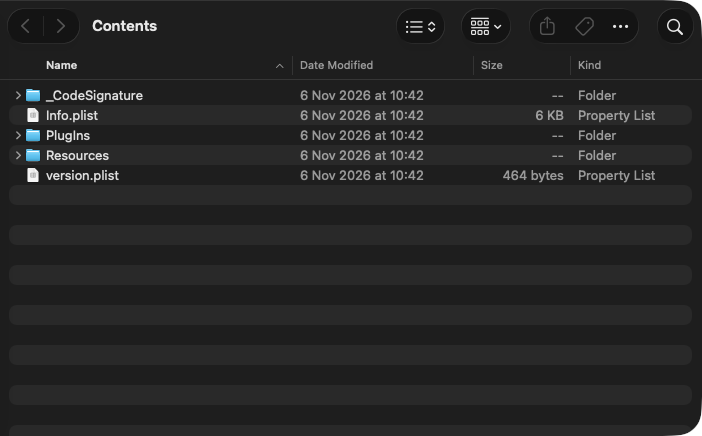
The kext’s executable normally sits in Contents/MacOS. Third-party kexts still work that way: HighPointRR.kext on the same machine carries Contents/MacOS/HighPointRR. Apple’s own kexts on Tahoe do not: of the 694 kexts in /System/Library/Extensions that name an executable, none had it inside the bundle. Since macOS 11 that code lives in the kernel collections described below.
Some kexts have no code at all. Apple calls these codeless kexts: the Info.plist carries everything. A Hackintosh USB map is this kind of kext.
Kexts are usually downloaded as zip files, for example Lilu-1.7.2-RELEASE.zip, but the kext inside is a folder, not an archive. Copy one to a Windows PC or to the FAT32 EFI partition and it shows up as an ordinary folder.
Where kexts live on macOS 26 Tahoe
| Location | What it holds |
|---|---|
/System/Library/Extensions |
Apple’s kexts, 705 of them on the 26.7.3 machine we inspected. They sit on the system volume, which has been read-only since macOS 10.15 and signed and sealed since macOS 11 |
/System/Library/KernelCollections |
The boot and system kext collections (BootKernelExtensions.kc, SystemKernelExtensions.kc), which hold Apple’s kexts linked and ready to load |
/Library/Extensions |
Signed third-party kexts on a real Mac. On our machine, only two HighPoint RAID drivers that macOS installs itself |
/Library/KernelCollections |
The auxiliary kext collection (AuxiliaryKernelExtensions.kc), built from third-party kexts |
EFI/OC/Kexts on the EFI partition |
Hackintosh kexts, which OpenCore adds at boot |
EFI/CLOVER/kexts/Other on the EFI partition |
The same for older Clover setups |
To list the collections and count Apple’s kexts on your own Mac:
Inspected by our setup on 17 Nov 2026: Intel Core i9-9980HK, macOS 26.7.3 (25G342). The last command printed 705.
ls -l /System/Library/KernelCollections
ls -l /Library/KernelCollections
ls /System/Library/Extensions | grep -c '\.kext$'
On an OpenCore Hackintosh, community kexts such as Lilu and VirtualSMC normally live only on the EFI partition. On our machine, kmutil reports 17 third-party kexts loaded from the boot collection, yet the boot collection on disk does not list them, and they are not in macOS’s extension folders either. OpenCore adds them at boot from the EFI partition.
How macOS loads kexts today
Since macOS 11 Big Sur, a kext has to be linked into one of three kext collections before it can load, and each collection is loaded once, at boot. Apple’s kexts are in the boot and system collections. Third-party kexts go into the auxiliary collection. A new third-party kext loads only after the user approves it, macOS rebuilds the auxiliary collection and the Mac restarts. Codeless kexts need the approval but no restart.
Apple has tightened the rules over the years:
- Kexts must be signed to load on macOS 10.11 and later. If you change a file inside a signed kext, it has to be signed again.
- Kexts installed with or after macOS 10.13 need the user’s consent.
- Since macOS 10.14.5, new or updated kexts must be notarized by Apple.
- Since Big Sur, macOS no longer loads kexts that use deprecated kernel interfaces by default, and it skips a kext when a DriverKit or system extension equivalent exists. Apple’s security guide says: “Kexts are no longer recommended for macOS.”
- On Apple silicon, third-party kexts need Reduced Security set in Recovery, and they must be built for
arm64e.
The machine we inspected shows both systems side by side: 22 Apple DriverKit drivers (.dext) in /System/Library/DriverExtensions, no third-party system extensions, and a kext for every third-party driver.
How a Hackintosh uses kexts
A Hackintosh needs kexts that no real Mac ships with, and they do three jobs. VirtualSMC makes the PC look like a Mac by emulating Apple’s SMC chip; Dortania’s guide says macOS will not boot without it. Lilu and its plugins patch macOS in memory: Lilu is a platform for patching kexts, libraries and programs, and WhateverGreen (graphics), AppleALC (audio) and others are Lilu plugins. The rest drive hardware Apple never used, such as Ethernet, Wi-Fi and Bluetooth chips, plus a USB map for your board.
Older guides describe Hackintosh kexts as modified copies of Apple’s, such as a patched AppleHDA.kext. AppleALC replaced that approach, because it patches audio “without any filesystem modifications”, and on Tahoe AppleHDA.kext is gone anyway (see the audio section below).
The kexts most builds need
| Kext | What it does | Latest release, as of 17 Nov 2026 |
|---|---|---|
| VirtualSMC | Emulates the Mac’s SMC; needed to boot | 1.3.8, 27 Sep 2026 |
| Lilu | Patching platform the other kexts plug into; VirtualSMC depends on it, so you need it to boot too | 1.7.2, 20 Mar 2026 |
| WhateverGreen | Graphics patches, set with boot arguments or DeviceProperties | 1.7.1, 27 Sep 2026 |
| AppleALC | Onboard audio codecs (needs AppleHDA, which Tahoe removed) | 1.9.8, 27 Sep 2026 |
| IntelMausi | Intel Ethernet; other chips need other kexts | 1.0.8, 3 Dec 2024 |
| USBToolBox | USB port mapping, together with a map kext made for your board | 1.2.0, 13 Jun 2025 |
Dortania’s Gathering files page lists the rest by chip. Check each project’s releases page before you build, because versions move. The machine we inspected loads 17 third-party kexts. Four of them, Lilu among them, are development builds newer than the latest releases, so use the table’s numbers, not ours.
OpenCore and load order
OpenCore is the bootloader current builds use. With it, kexts go in EFI/OC/Kexts on the EFI partition, and each one is listed in config.plist under Kernel -> Add. OpenCore loads them in the order of that list, so a kext’s dependencies have to come first: Lilu before its plugins, VirtualSMC before SMCProcessor and SMCSuperIO. ProperTree’s OC Snapshot fills in the list from your Kexts folder and sorts it by dependency.
We did not mount the EFI partition for this update, so the config.plist side of this comes from OpenCore’s documentation, not from our machine. The full build, kexts included, is in the macOS Tahoe Hackintosh guide.
Clover on older setups
Clover was the most common Hackintosh bootloader for years. Most of the community has since moved to OpenCore, and Acidanthera, the team behind Lilu, VirtualSMC and OpenCore, only supports OpenCore. Clover is still maintained (r5176, released 26 Oct 2026). It loads kexts from EFI/CLOVER/kexts/Other, or from a folder named after a macOS version. Its package ships those folders empty, so you add the kexts yourself. If you still run Clover, see our Clover bootloader install guide.
Kexts and audio on macOS Tahoe
macOS 26 Tahoe removed AppleHDA.kext, Apple’s driver for onboard audio codecs, in its second beta. AppleALC works by patching AppleHDA, so on Tahoe it gives no analog audio on its own. Dortania says digital audio over HDMI, DisplayPort and USB still works, and lists two ways back to analog, both with SIP lowered: put AppleHDA.kext back on the root volume, or install VoodooHDA in /Library/Extensions.
On our Tahoe 26.7.3 machine, AppleALC 1.9.8 loads, but there is no AppleHDA, the onboard audio controller has no driver attached, and the only sound devices are USB ones: a headset, a webcam and a DisplayLink USB device. We did not try either workaround. The macOS Tahoe Hackintosh guide covers audio for a new build.
How to see which kexts are loaded
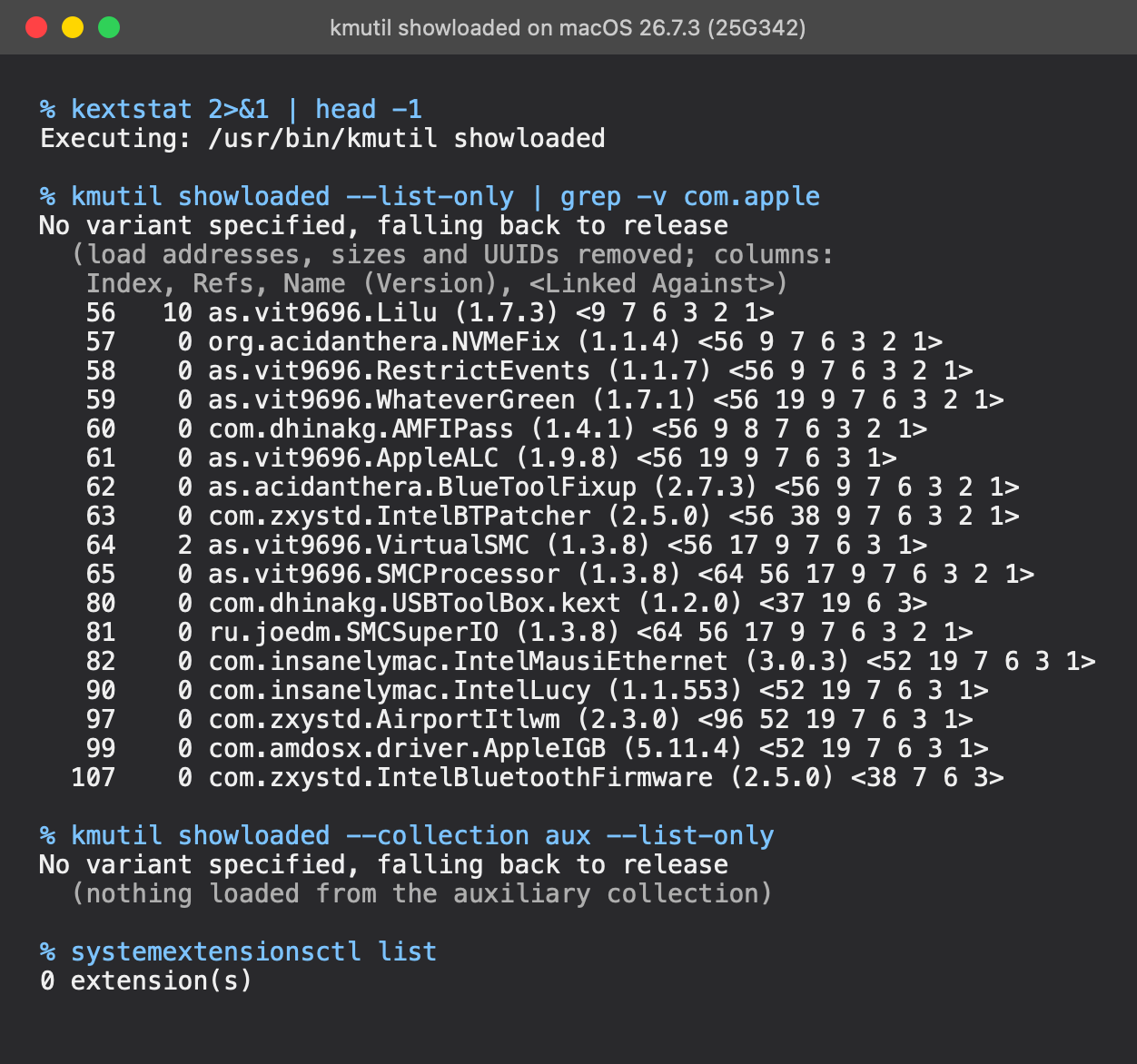
Run this in Terminal to list every loaded kext that is not Apple’s:
Inspected by our setup on 17 and 18 Nov 2026: Intel Core i9-9980HK, macOS 26.7.3 (25G342). Both runs listed the same 17 third-party kexts.
kmutil showloaded --list-only | grep -v com.appleThe first line, “No variant specified, falling back to release”, only says that kmutil is reading the normal release kexts, because you did not ask for a development or debug variant with -V. Besides load addresses, sizes and UUIDs, each line shows the load index, the bundle ID, the version and, in angle brackets, the indexes of the kexts it links against. On our machine Lilu is index 56, and every Lilu plugin has 56 in its list, so you can read the load order from the OpenCore section straight off the running system. Add --collection boot, sys or aux to show one collection.
What happened to the kextcache command
This site is named after kextcache, the command older macOS used to create kext caches, which speed up kext loading. Since macOS 11, kmutil does that job, and it also replaced kextload, kextunload and kextstat. The old commands are still there, but their man pages mark them deprecated. On Tahoe, kextstat prints “Executing: /usr/bin/kmutil showloaded” before its output, and the kextcache man page says the tool “should no longer be necessary to use”.
Where to go next
- Check your hardware first: Hackintosh compatibility list for macOS Tahoe
- Then install: macOS Tahoe Hackintosh guide with OpenCore
- Map your USB ports: USB mapping for Hackintosh in Windows
- Keep macOS and your kexts current: how to update your Hackintosh
- New to all this: what a Hackintosh is and how it works
Changes
- 18 Nov 2026: rewrote the page from scratch for macOS 26 Tahoe and OpenCore.
- 18 Nov 2026: corrected where kexts live, the advice on editing kexts, the AppleHDA example and the Clover section; dropped MultiBeast; added how kexts load since macOS 11, a table of core Hackintosh kexts and the Tahoe audio change.
- 18 Nov 2026: replaced the cover photo with the
kmutiloutput from the Tahoe 26.7.3 machine we inspected, and added a Finder screenshot of a kext’s contents.
Frequently asked questions
Can I still edit a kext?
You can look inside any kext, but do not edit Apple's. They sit on a sealed, read-only system volume, and Apple says a signed bundle that you change has to be signed again. On a Hackintosh, settings go in OpenCore's config.plist instead, as boot arguments or DeviceProperties. A codeless kext, such as a USB map, is the exception, because it is only an Info.plist made for your machine.
Do Hackintosh kexts work on Apple silicon Macs?
No. Hackintosh kexts such as Lilu and VirtualSMC are built for x86 PCs, not for Apple silicon. An Apple silicon Mac loads third-party kexts only after you set Reduced Security in Recovery, and each kext must be built for arm64e.
Where do I put kexts on a Hackintosh?
With OpenCore, in EFI/OC/Kexts on the EFI partition, with a matching entry in config.plist under Kernel -> Add, dependencies first. With Clover, in EFI/CLOVER/kexts/Other. Do not copy them into /System/Library/Extensions, which has been on a read-only system volume since macOS 10.15.
Comments
No comments yet.
Report