
On this page
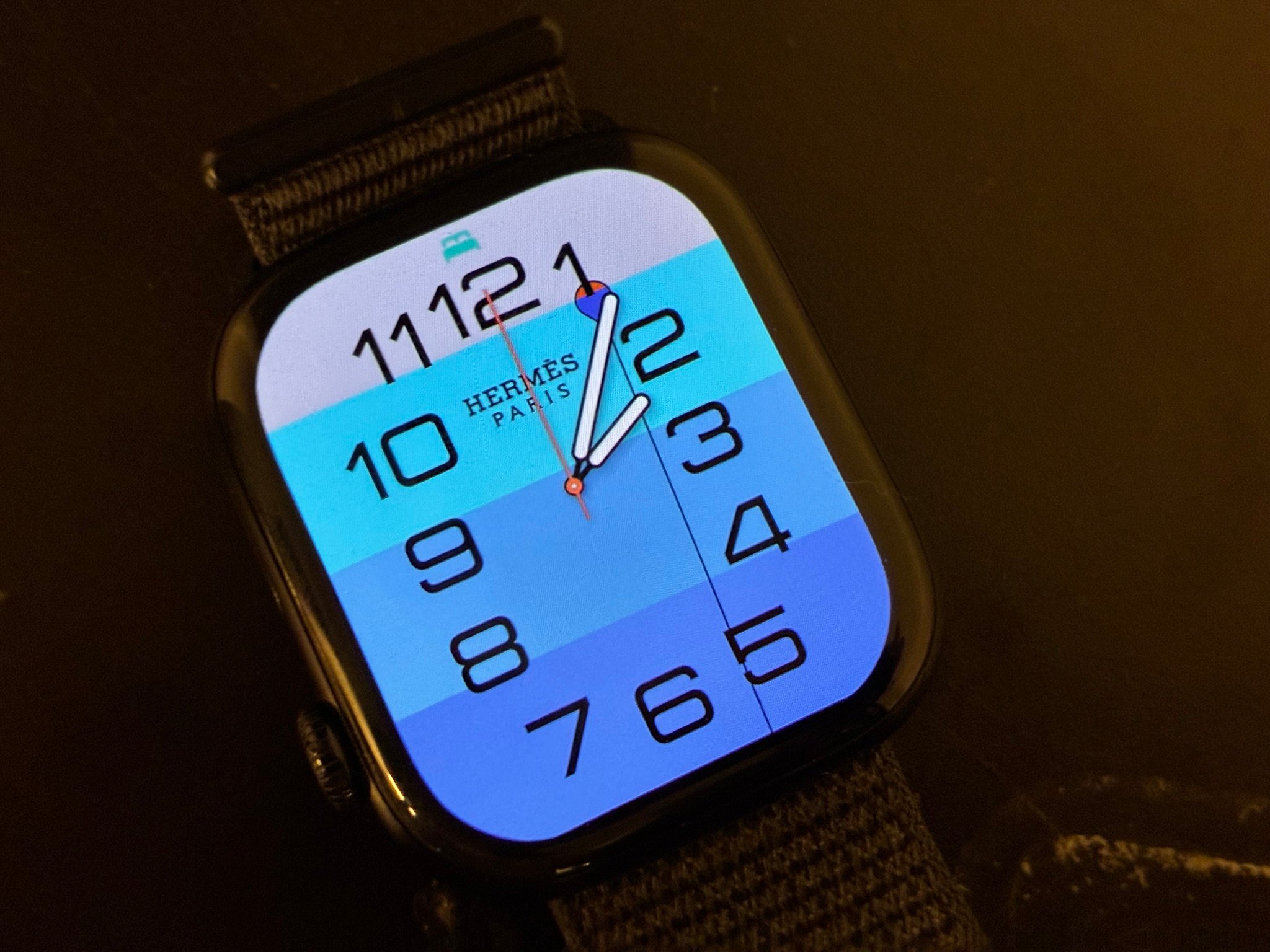
Ever stared at the Hermès Apple Watch faces and thought, why are those locked to the watch that costs a fortune? Yeah — same. Turns out you don’t need the Hermès model at all. HermesEnabler 2 is a free, open-source app that drops those faces onto a normal Apple Watch (that blue one up top is the face you’re after). Before you dive in though, there are a few catches you SHOULD know about first. Let’s get into it.
The short version: it supports watchOS 27.0 through 27.3 beta 1, you install it from a Mac or a Windows PC, you need Developer Mode on both your iPhone and your Watch, and the project’s README ends with “Use at your own risk.” Yes, really. Don’t skip that line.
From the project’s README, release notes and Apple’s pages, read on 18 Nov 2026. Not tested by us: we did not install HermesEnabler 2 or run it on a watch, because we have no Apple Watch on a supported watchOS version.
Everything below comes from the GitHub README, release notes and commit history of pookjw/HermesEnabler, plus Apple’s own pages. So this is me reading the project for you, not me telling you how it went on my wrist.
Cover photo: the Hermès watch face on an Apple Watch (Kextcache).
What HermesEnabler 2 does
The GitHub description says “Enable Hermès Watch Faces on any Apple Watch devices”. Jinwoo Kim publishes it under the MIT licence. It had about 2,200 stars on 18 Nov 2026, and the first release, 1.0, only landed on 10 Nov 2026. The latest release as I write this is 1.6.2, from 16 Nov, and the last commit was on 18 Nov. So it’s moving fast.
How it works from your side: you put a small app on your iPhone and on your Apple Watch, open it on the watch and follow the steps it shows. The project doesn’t spell out how the faces actually get enabled, and I’m not going to guess here either.
Later releases added more than the faces. The release notes mention controls for Apple Intelligence and on-device Siri, separate region settings, screen resolution presets, and a backup library. Each of those is another change to your watch, and I haven’t looked at what any of them does. Keep that in mind.
What the Hermès faces are
Apple sells the Apple Watch Hermès line as its own collection. On Apple’s Hermès page the fall collection comes as Series 12 and Ultra 4 models, and Apple treats the faces as part of each design. One gold-case model comes with what Apple calls “the exclusive matching watch face”, with a lunar phase and date. Apple also lists four new Depth faces, from the sunlit surface to the darkest depths, with a diver in descent and a pair of seahorses guarding the orange Hermès box. Other faces on the page show complications such as weather, Paris time, UV index, noise and Activity rings.
Apple’s page doesn’t say the faces are blocked on other watches, and it never mentions HermesEnabler. I found no Apple statement about the tool.
Which watchOS versions it supports
| watchOS | Status according to the project |
|---|---|
| 27.0 through 27.3 beta 1 | Supported (README) |
| 26.x | Not supported (README, 18 Nov 2026) |
The release notes show the developer adding support one build at a time: 27.0 beta 3, 27.0 release candidate and 27.2 beta 1 each get a line. So read the README range as a list of builds he has handled, not a promise for anything newer.
Releases 1.6, 1.6.1 and 1.6.2 (15 and 16 Nov) added experimental watchOS 26 support and said it was not verified, because the developer had no watch on watchOS 26. The 1.6.2 notes add that users report the app doesn’t work there. On 18 Nov the README was changed to say watchOS 26 is not supported. If you’re on 26, that’s your answer for now.
The README doesn’t list which Apple Watch models work. Apple says watchOS 27 runs on the Apple Watch SE 3, Series 9 to 12 and Ultra 2 to 4, paired with an iPhone 11 or later or an iPhone SE (2nd generation or later) on iOS 27. I’d assume HermesEnabler is limited to those, but that’s my reading, not something the project says.
What you need
- An iPhone paired with the Watch. The Watch must be on a supported watchOS version.
- A computer to install from. On a Mac, the README gives you two routes: the prebuilt IPA from the Releases page installed with Sideloadly, or building the project in Xcode. On Windows, it points to WatchBridge, a community tool that the README says is not affiliated with Apple or with this project. WatchBridge needs iTunes or the Apple Devices app, supports one paired Watch at a time, and its executable is unsigned, so Windows SmartScreen may warn you. Don’t panic at that warning, but do know why it’s there.
- An Apple ID. On 18 Nov 2026 the developer removed the README line that said a paid Apple Developer account was required. A free Apple ID is now enough as far as the README goes. Here’s the catch: Sideloadly says apps signed with a free Apple ID last 7 days, and its auto-refresh feature re-signs them. A paid account ($99 a year) stretches that to a year.
- Developer Mode on both devices. The README has you turn it on under Settings, Privacy & Security, Developer Mode on the iPhone and on the Watch, restarting each time. On Windows you need a USB connection for that step.
One thing I couldn’t find: what happens to the changes when the 7-day signing runs out. Neither the README nor Sideloadly’s page says. If that matters to you, check the project’s issues before you start.
How installation works, in short
On a Mac with Sideloadly, the README’s steps run roughly like this:
- Download the IPA from the Releases page.
- Sign and install it to your iPhone with Sideloadly, with “Use automatic bundle ID” turned off and a fixed bundle identifier set.
- Trust your developer certificate on the iPhone, then turn on Developer Mode there.
- In the Watch app on the iPhone, install HermesEnabler2 on the Watch.
- Turn on Developer Mode on the Watch, then open HermesEnabler2 there and follow its steps.
The Xcode route and the Windows route differ in the middle, and I haven’t copied those steps here. Go with the official README for the current ones. Don’t rush it, and ask in the issues if you get stuck.
What early users report
I went looking for Reddit threads about HermesEnabler on 18 Nov 2026 and found none I could read. Reddit search only returned older posts about Hermès faces in general, and I didn’t log in anywhere. What I could read is the project’s own issue tracker, which had more than 80 open issues and pull requests that day, plus a few news write-ups. The points below are user reports from that tracker, read on 18 Nov 2026. I haven’t verified any of them, and the developer has answered only some.
- Watches reported working: one user on a stainless steel Apple Watch Series 9 with watchOS 27.2.1 wrote “all good” on 11 Nov (#41). Another Series 9 user, also on 27.2.1, got a message that the app’s data layout was “not verified” for his exact build and nothing happened when he tried to enable the faces (#3). Same watch, same version, different result. Yeah.
- watchOS 27.3 beta 1 is patchy. Ultra 4 owners on build 24S5284h report that the backup step fails with a “MobileGestalt access failed” message on release 1.6.2 (#101), that the faces don’t show up in the gallery (#56), or that the Hermès face reverts when they change its colour (#63). One Ultra 4 user in #56 said that once the faces loaded they were usable. Newer builds are an open question: there are issues titled “Not work in 27.3 beta2” (#97) and asking for 27.3 beta 3 (#99).
- watchOS 26 fails. Reporters with an Ultra 1, Series 6, Series 7 and SE 2 on watchOS 26.5 or 26.6.1 say the backup step stops with an access error, including on 1.6 and 1.6.1 (#90). That lines up with the README’s “not supported”.
- The Watch app can vanish. Several users say the Watch app disappears after a reboot or after opening the Watch app on the iPhone, although the faces kept working (#64). Users who lost the app also lost their original backup (#28), and without it they couldn’t switch the faces off (#34). The developer’s reply in #34: deleting and reinstalling the Watch app deletes the backup, and Sideloadly installs need the fixed bundle identifier. The #34 reporter says he updated from release 1.3.0 to 1.4.1 without deleting anything, so the cause isn’t settled. It does fit the README telling you to restore before you delete.
- Ultra faces on other watches change the screen. The app has a second switch for Ultra watch faces, and users report oversized or clipped screens on a Series 10 (#28) and wrong resolution on a Series 9 (#19). The ithinkdiff write-up of 11 Nov also says turning Ultra faces on means giving up the Hermès Faubourg Party face.
- Free Apple ID. One user building in Xcode with a free Personal Team hit a signing error (#83); another replied on 16 Nov that WatchBridge installs it with a free account. A user with a paid account hit the same backup error in #101, so paying isn’t a guarantee.
- Faces survive a reboot. The reporter in #56 says the changes were still there after a reboot. One user says a Hermès face that reset its colour was fixed by restarting the watch (#72). I saw no report on what happens at a watchOS update.
- Bricking: in the dozen or so threads I opened, nobody described a watch that stopped working. People did describe lost backups, wrong screen sizes and failed installs. I didn’t read every issue, so don’t take that as a guarantee.
As for reception, the repository had about 2,200 stars on 18 Nov, eight days after the 1.0 release, and ithinkdiff (11 Nov), Zendot (12 Nov) and appleinsider.ru (12 Nov) all covered it.
Risks and cautions
- The README’s closing line is “Use at your own risk.” The MIT licence also provides the software without warranty.
- Back up and restore. The README says to restore your MobileGestalt backup through the HermesEnabler2 app BEFORE you delete the app. Release 1.5 added a backup library with initial, manual, automatic and imported backups, transfer between Watch and iPhone, and backup verification. Later notes mention a warning when an original setting can’t be restored. I’d export a backup to the iPhone before changing anything, though that’s my advice and not the README’s.
- One bundle ID, one Apple ID. Keep the same bundle identifier and Apple ID for every update so the app keeps its data and its backup.
- The Watch app can go missing. If the iPhone app installs but the Watch app doesn’t appear, check the Sideloadly log for “Watch apps will be stripped from the IPA”. The README says to install the Watch app with Xcode in that case.
- Apple can close it. Support follows specific watchOS builds, and nothing in the README says it will carry over to the next update. I found nothing from Apple about the tool. If you rely on updates, hold off on updating watchOS until the README lists the new version.
- Warranty and support. The README doesn’t mention warranty, and I didn’t find Apple’s position on devices running tools like this. I also didn’t read Apple’s warranty terms in full, so that’s a gap in what I checked, not a finding. Check them before you lean on Apple support for a watch you’ve changed.
- Developer Mode is a setting you turn on for this, and the README doesn’t say whether to turn it off afterwards.
Should you try it?
My take: if you badly want a Hermès face and have a spare watch on watchOS 27.0 to 27.3 beta 1, go for it. The project looks active and is open about its limits. If the watch is your daily driver, think twice. That’s a lot to ask for a watch face: two Developer Mode restarts, a signing renewal every 7 days on a free Apple ID, a backup to look after, and a tool that may stop working with the next watchOS release. The issue tracker shows it working for some Series 9 owners and struggling on 27.3 beta 1, so check the open issues for your exact watch and build first.
FAQ
Can I get Hermès watch faces on a regular Apple Watch?
HermesEnabler 2 says it can, on watchOS 27.0 through 27.3 beta 1, if you install it from a Mac or a Windows PC and turn on Developer Mode on both your iPhone and your Watch. We have not tested it, so read the cautions above first. The project’s README ends with “Use at your own risk.”
Does HermesEnabler 2 work on watchOS 26?
Not officially. As of 18 Nov 2026 the README says watchOS 26 is not supported. Releases 1.6 to 1.6.2 added experimental watchOS 26 support that the developer said he had not verified, and the 1.6.2 notes say users report the app does not work on watchOS 26.
Is HermesEnabler 2 safe?
We can’t say. The code is public under the MIT licence, so anyone can read it, but we have not audited it or run it. The developer’s own README says to use it at your own risk and to restore your backup before you delete the app.
Changes
- 18 Nov 2026: first published.
Frequently asked questions
Can I get Hermès watch faces on a regular Apple Watch?
HermesEnabler 2 says it can, on watchOS 27.0 through 27.3 beta 1, if you install it from a Mac or a Windows PC and turn on Developer Mode on both your iPhone and your Watch. We have not tested it, so read the cautions above first. The project's README ends with "Use at your own risk."
Does HermesEnabler 2 work on watchOS 26?
Not officially. As of 18 Nov 2026 the README says watchOS 26 is not supported. Releases 1.6 to 1.6.2 added experimental watchOS 26 support that the developer said he had not verified, and the 1.6.2 notes say users report the app does not work on watchOS 26.
Is HermesEnabler 2 safe?
We can't say. The code is public under the MIT licence, so anyone can read it, but we have not audited it or run it. The developer's own README says to use it at your own risk and to restore your backup before you delete the app.



Comments
No comments yet.
Report